When something breaks, the right vendor is already on the way.
No more telephone game between the kitchen, the office and the vendor. Managers call one AI repair line, tap the app, or scan a sticker on the equipment — Fixbell logs the ticket, gets approval when it's needed, and calls the vendor, day or night.
Walk-in cooler not holding temp
When something breaks, every manager asks the same four questions.
Today that means a chain of calls and texts — manager to office, office to vendor, vendor back to nobody. Fixbell answers all four, automatically, every time.
“Who do we call?”
Every location's vendors live in one directory. Fixbell picks the right one for the location and the type of problem.
“What do we do?”
The AI walks the manager through it on the phone and opens a complete ticket. Nobody needs to know the process.
“Did they acknowledge it?”
You see the moment a vendor confirms. If nobody acknowledges an urgent ticket within 15 minutes, your admins are alerted.
“Does this need approval?”
Your rules decide for each vendor. When approval is needed, the approver gets a one-tap approve link right away.
Listen in on a real-time repair call.
One call from the manager. Fixbell handles the rest — watch each step happen as the conversation goes.
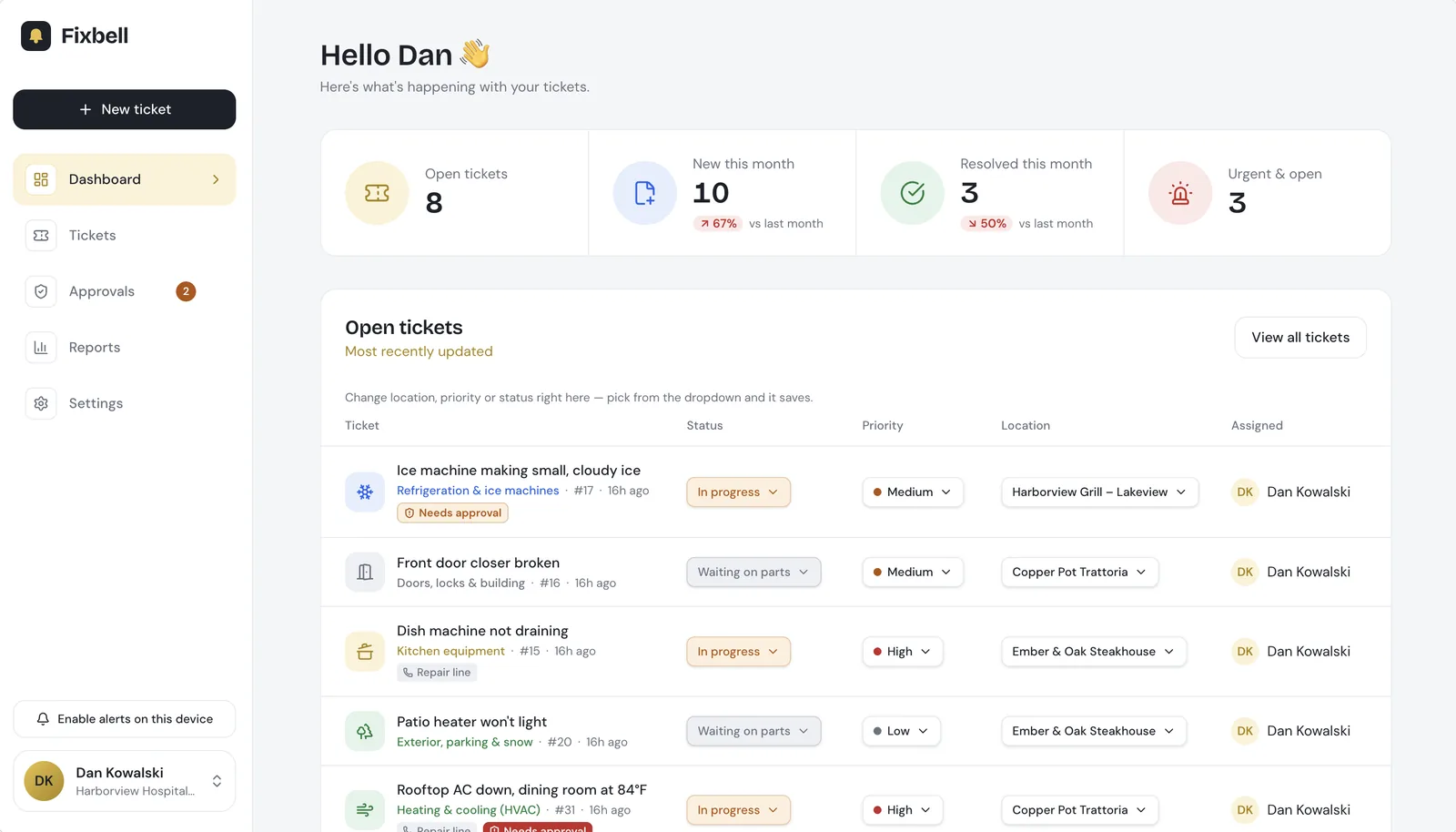
Every repair, every location, one clean view.
No spreadsheets, no group texts. Corporate sees every open ticket at a glance and changes status, priority or location right from the list.
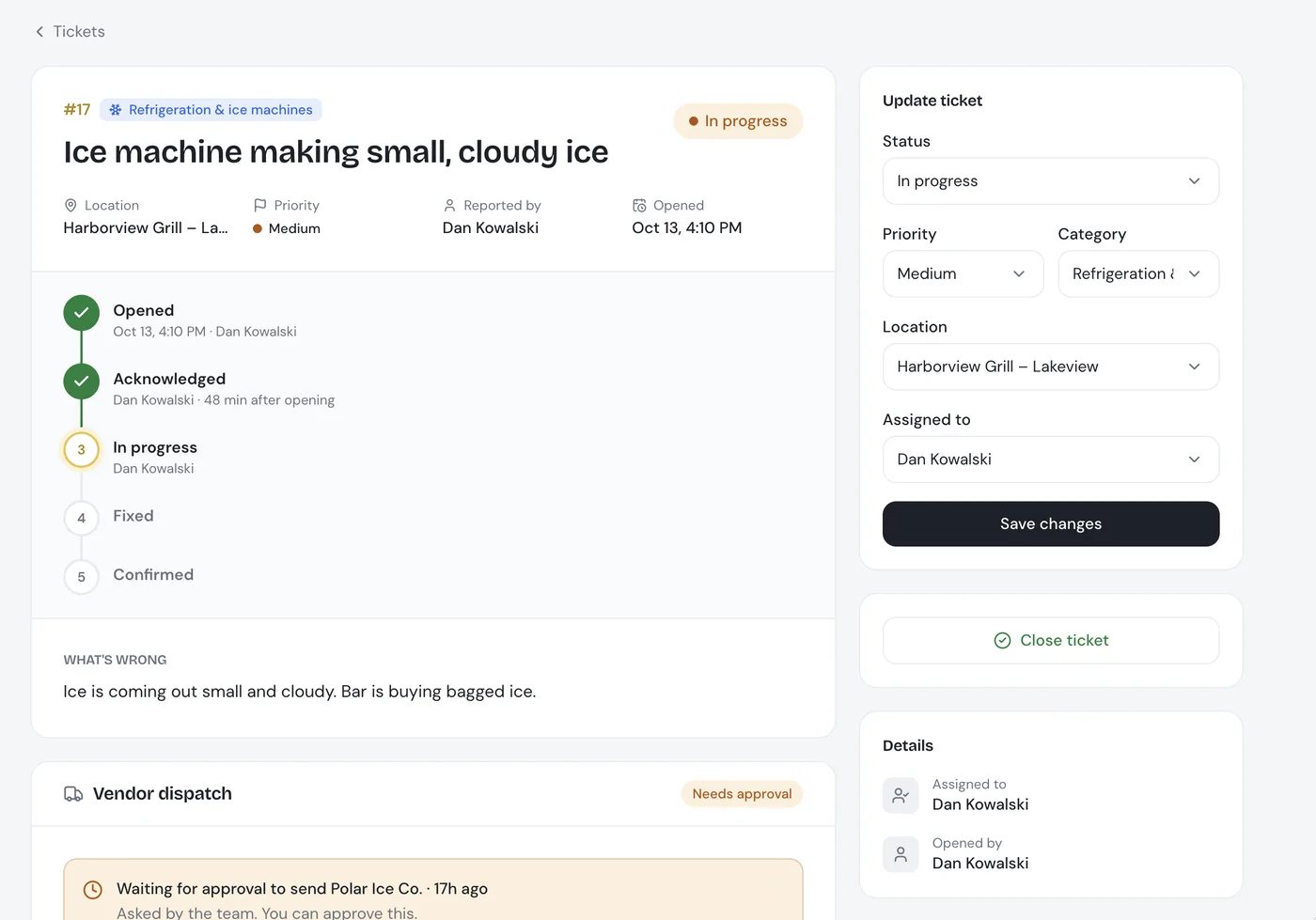
Each ticket tells the whole story.
- Where it stands: opened, acknowledged, in progress, fixed, confirmed by the restaurant.
- Vendor dispatch built in: see who Fixbell is calling, who confirmed, and what's waiting for approval.
- Update in seconds: status, priority, location or who it's assigned to, from the web or the phone app.
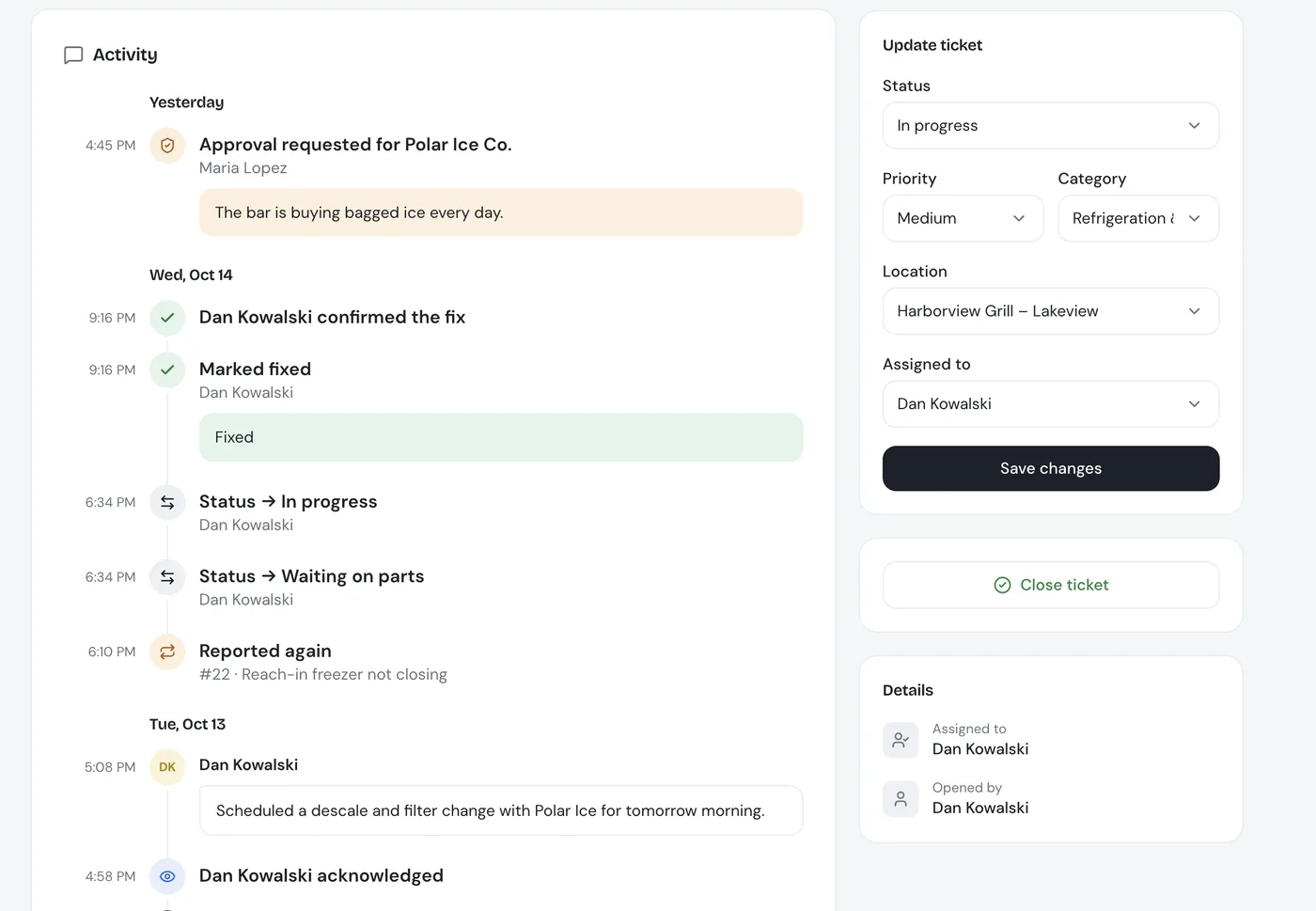
Every step, in plain English.
- One timeline: approvals, vendor calls, status changes, notes and fixes, newest first and grouped by day.
- Nothing gets lost: repeat problems are linked, so a broken freezer that keeps coming back is easy to spot.
- Same on every screen: the web, iPhone, iPad and Android all show the same history.
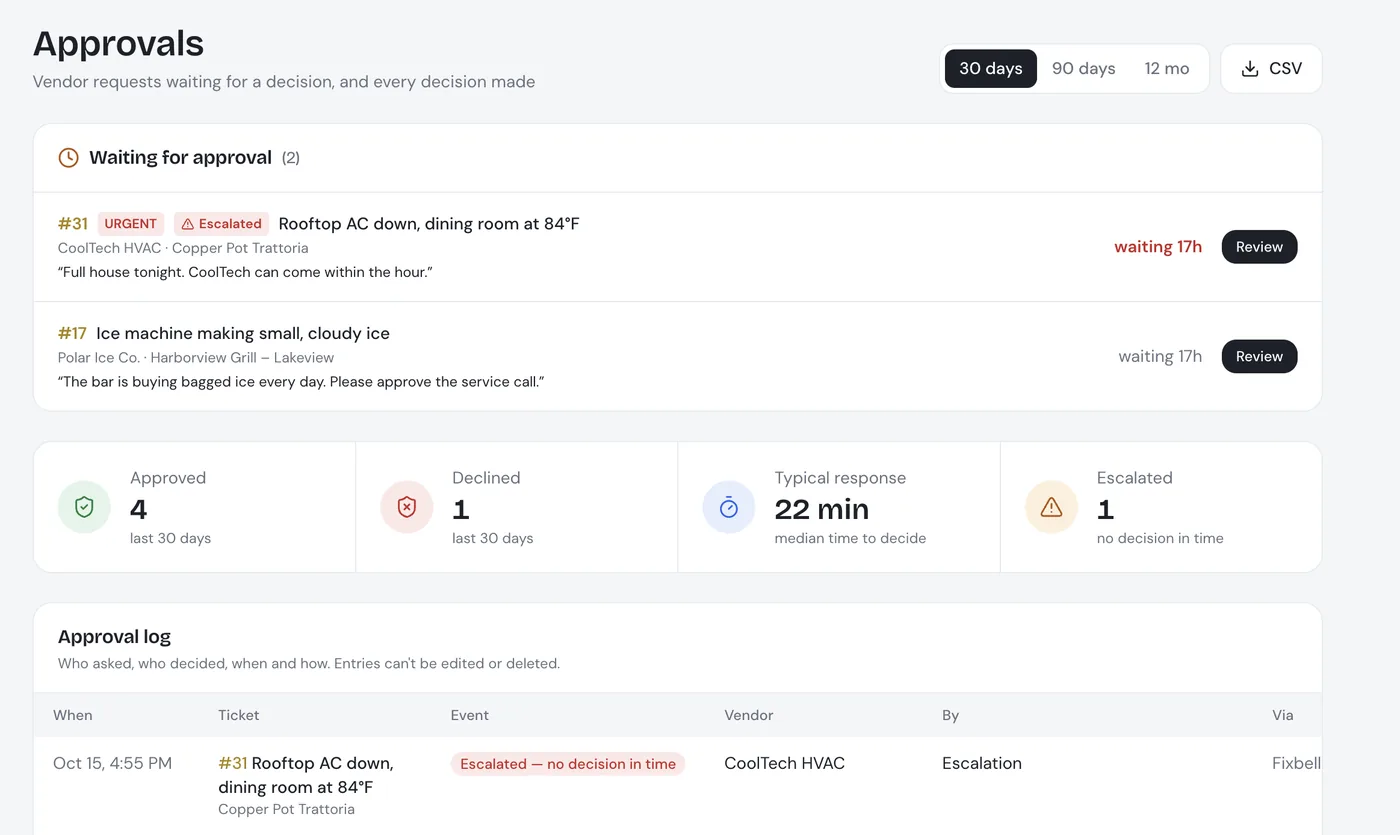
Approvals with a paper trail.
- Decide in one tap: approvers see what's waiting, why, and for how long, and approve from the app or an email link.
- Never stuck: urgent requests escalate automatically when nobody decides in time.
- Audit-ready: every request and decision is logged with who, when and how, and exports to CSV.
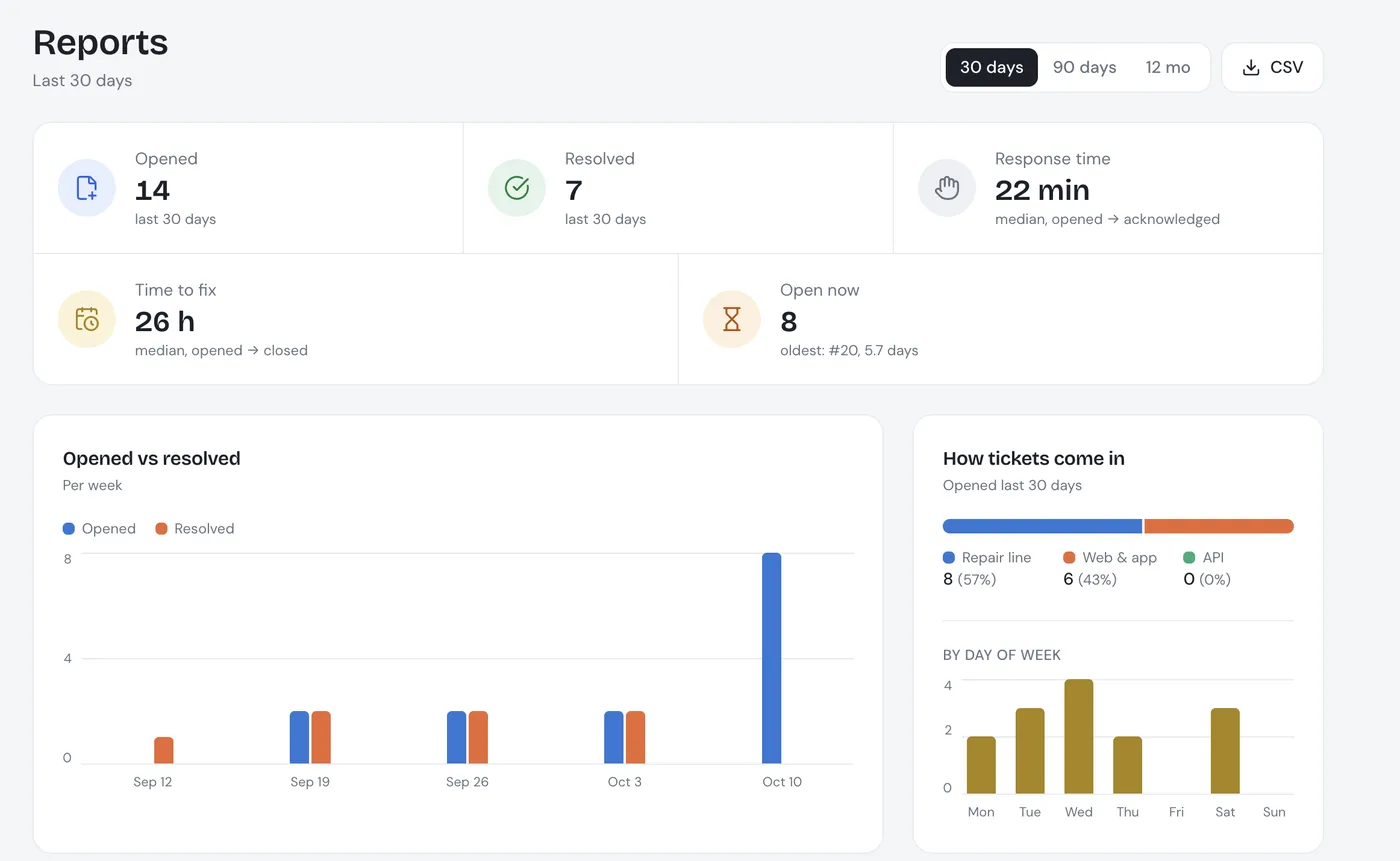
Know where the time and money go.
- Response and fix times: how fast each ticket is picked up and fixed, at a glance.
- Where repairs come from: repair line, web or app, and which days are busiest.
- By location and category: see which restaurants and which equipment keep needing work, and export it to CSV.
One system for everyone who touches a repair.
Report it once, then get back to service.
- One number to call for every repair, 24/7
- No hunting for vendor numbers at 10 PM
- Scan a QR sticker and the form fills itself
- Live status on every ticket, in the app or on the web
Control spend without slowing anyone down.
- Approve with a not-to-exceed amount, from a push alert or email
- No decision in 15 minutes? Backup approvers and admins are alerted
- Full approval log: who approved what, when and for how much
- Escalated · no decision in 15 minApprovers and admins alerted.
- Approval requested · Luca Bianchi (GM)
The right vendor gets the job, with everything they need.
- An AI call and an email — no app for vendors to install
- Problem, location, contact and not-to-exceed up front
- They confirm on the call or with the “I'm on it” button in the email
Built for the way restaurants actually break.
24/7 AI phone line
One number for your group. It recognizes your staff, takes notes, and opens the ticket during the call — or transfers urgent calls to your facilities lead, your choice.
Automatic vendor calls
Once a ticket is cleared, Fixbell calls and emails the vendor's contacts in order until one confirms — after-hours contacts first at night.
Approvals & escalation
Mark which vendors need sign-off. Approvers decide from a push alert or a one-tap email link, and urgent tickets escalate after 15 minutes.
Vendor directory
Each vendor's trades, locations, contacts, business hours and approval setting, managed per organization.
Reports & audit trail
Every call, approval and vendor response is logged with a timestamp. Response times, repair spend by location and vendor, CSV export.
Native mobile apps
Real iPhone, iPad and Android apps for managers and approvers, with push alerts — and the urgent ones you can't miss.
Frequently asked questions
What is Fixbell?
Fixbell is an AI maintenance desk for restaurant groups. Managers report a repair by calling one 24/7 phone number, using the app or scanning a sticker on the equipment. Fixbell's AI opens the ticket, gets approval when your rules need it, and calls and emails the right vendor until someone confirms.
How does the AI repair line work?
The manager calls one number and describes the problem in plain words. The AI knows who is calling and which restaurant they're at, asks the follow-up questions a facilities manager would ask, and opens a complete ticket with the call transcript. Nobody has to remember which vendor to call.
How does Fixbell end the phone tag between managers, the office and vendors?
Every update lands in one place. The approver gets a one-tap approve link, Fixbell calls the vendor's contacts in order until one confirms, and the manager, the office and the vendor all see the same ticket and timeline, so nobody has to call around for an update.
Can approvals be required before a vendor is called?
Yes. You decide per vendor whether approval is needed and who approves, with a not-to-exceed amount. Urgent approvals escalate automatically if nobody decides in time.
Does it work after hours and on weekends?
Yes. The repair line answers 24/7, and Fixbell calls a vendor's after-hours contacts first at night.
Do vendors need to install anything?
No. Vendors get a phone call and an email. They confirm on the call or with the “I'm on it” button in the email.
Is there a phone app?
Yes. Fixbell has native iPhone, iPad and Android apps for managers and approvers, with push alerts, plus a web portal for the corporate office.
Stop chasing repairs. Let Fixbell handle the calls.
See the phone line, approvals and vendor calls working on a live demo, set up for one of your locations.
- Pick a time that suits you — it's a Zoom call
- 30-minute walkthrough
- Call the AI line yourself during the demo
- Built in Chicago for restaurant groups